
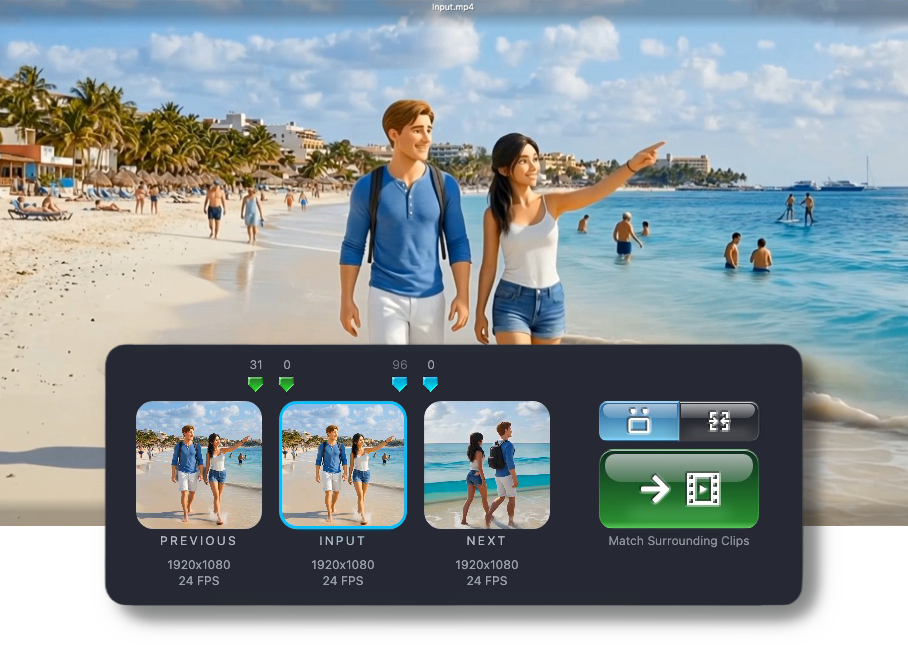
Precision Video Color Matching
Stop AI Color Drift.
Color-correct video clips with pixel-perfect precision.
Export color-correct frames for consistent generative results.

Color Correct is a video editing tool for seamlessly color-matching your uploaded media — clip to clip, scene to scene.
Does your Seedance clip have distorted proportions relative to the start frame? Or did you extend a clip in Seedance 2.5, only to see a slight color pop between the new clip and the previous clip? Color Correct solves all that.
They escaped from the Shadow Keep but they’re not out of the woods yet. Greth keeps an eye out for danger as Nanji mage-splains the benefits of the Color Correct web app for AI filmmakers in this ad-venture. Filmed as one continuous shot using Color Correct to seamlessly color-match consecutive AI generations.
The Special Ingredient: Frame-Pair Matching
Color Correct creates a precise color transform from a matched frame pair between two clips, then applies that transform to every frame. It works whenever two clips share a frame with the same content but a different color balance — sequential AI generations, scene replacements, or any cut that drifted apart in post.
The color balance jumps in the “before” example video below are subtle, but video creators know how quickly tiny shifts can make a shot feel unstable, inconsistent, or obviously stitched together.
Before
After
Post-processing
Video Color Correction
The Secret Cause of
Color Drift
Whenever a frame travels between tools — exporters, encoders, image editors, or downstream pipelines — color information can be reinterpreted along the way. Each step looks fine in isolation, but the result drifts further from the source.
Standard video editors export frames that look fine to the human eye, but often apply gamma adjustments or embed color profiles intended for normal video playback.
Those exports can still appear correct in an editor or image viewer, while a downstream tool reads the same pixels differently. The result is color drift: shifted brightness, altered contrast, and changes in hue that break continuity from shot to shot.
⚠ Stop the flicker before it starts.
Standard Frame Export
An exported frame looks correct, but a generative clip built from it ends up with a different color balance.
Color Correct Frame Export
A generative clip built from a Color Correct frame keeps the same color balance as the original video.
Production pipeline
Color-Correct Frame Export
An Essential Toolkit for AI Filmmakers
A full complement of tools for working with video, image, and audio media.
Best-in-Class Color Correction
For correcting and preventing color drift between successive AI generations.
- Frame-Pair Color Matching
Proprietary algorithm for seamless clip extensions and replacements. - Color-Correct Frame Export
Exported frames pre-compensate for generative color drift. - Exclusion Masking
Easily exclude areas of divergent content from frame-pair color matching.
Video Manipulation
Handle common video production pipeline tasks without having to make an import/export round trip to a conventional video editor.
- Video Lip-Sync and Talking Avatar
Lip-sync a video or turn an image into a talking avatar, both using sync-3 technology. - Video Rescaling
Automatically fix Seedance 2.0 scale distortion relative to start frame. - Chroma Key
Sophisticated chroma key background removal for green screen effects. - Crop, Overlay, Clip, and Splice Videos
Adjust video clips using simple and precise controls.
Additional Tools
For a variety of production pipeline needs.
- Extract Audio
Extract the audio stems into separate "voices" and "sounds" audio files for dubbing and lip-sync purposes. - Add or Replace Audio
Includes adding audio to an image to make a freeze frame video. - Silence Audio
Silence part or all of a video's audio track. - Remove Image Background
Assists with creating character reference images.
Ready to stabilize your generations?
Eliminate color flicker from clip extensions, inserts, and scene replacements.
Simple Pricing.
Free to start
See what Color Correct can do — at no cost.
$0 /month
- Color-correct your videos and images
- Color-correct frame exports
- 2,000 credits/month
- Watermarked outputs
(instantly removed on plan upgrade) - No credit card required, no marketing spam
Most Popular
Standard
For serious creators who need pixel perfection.
$10 /month
- Color-correct your videos and images
- Color-correct frame exports
- 10,000 credits/month
- Watermark-free outputs, including those created on the Free plan
- Easily cancel or resume any time
Pro
For high-volume creators.
$20 /month
- Color-correct your videos and images
- Color-correct frame exports
- 30,000 credits/month
- Watermark-free outputs, including those created on the Free plan
- Easily cancel or resume any time
Select a plan in account settings after creating an account. See how credits work for more details.
Color Correct only processes user-provided media. It does not generate new content.
v1.18.5